Bolisa

Shipment Operations

Every shipment on one file. Every team working on it.

A shipment touches sales, freight, customs, trucking and finance. When each team keeps its own records, handovers depend on messages, and a shipment’s status lives with whoever last touched it. In Bolisa, one file carries the whole shipment, so your teams work on the same record and you can see where every shipment stands.

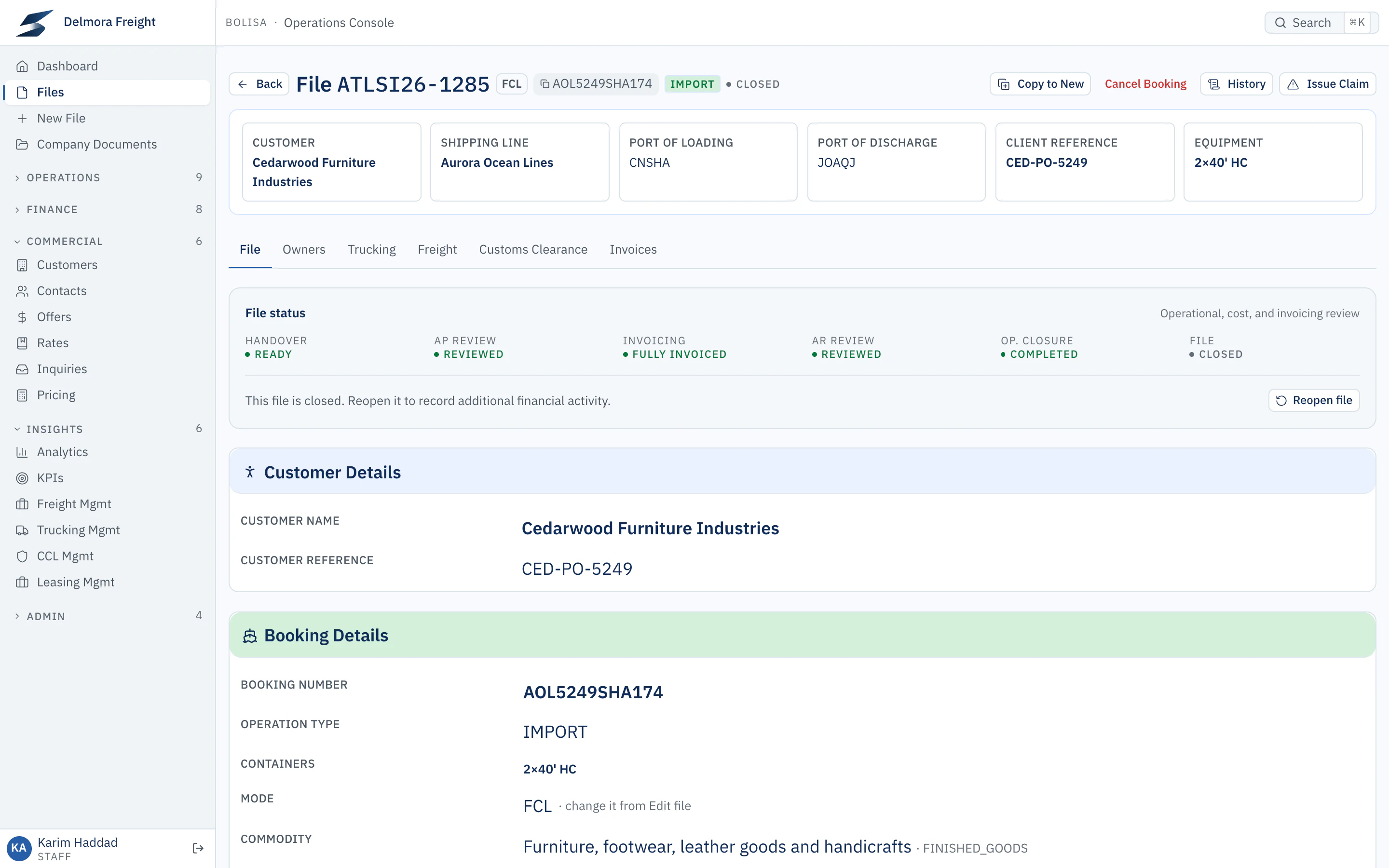
Bolisa · File ATLSI26-1285
A closed shipment file whose status panel shows handover ready, cost review and customer review done, fully invoiced, operations complete and the file closed.Open full-size screenshot
Product interface shown with demonstration data

What your teams can do

One file for the whole shipment

Freight, customs clearance, trucking, container leasing and value-added services sit on one file, with the customer, shipper, consignee and the owner of each service. Add a service when the customer asks for it, without starting a new file.
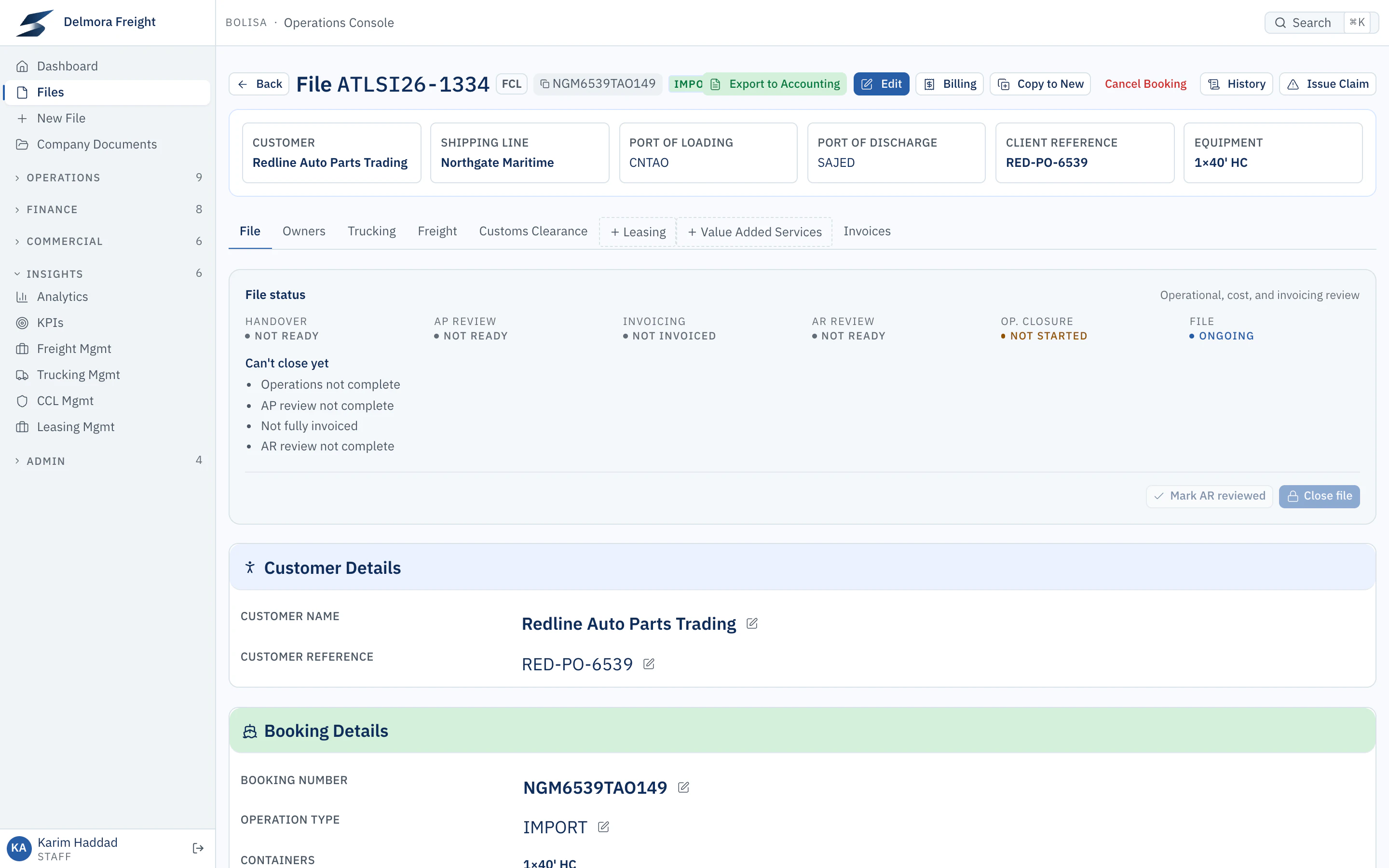
Bolisa · File ATLSI26-1334
An import shipment file opened from the drilldown. Its status panel shows the file can’t close yet and lists why: operations, cost review, invoicing and customer review are not complete.Open full-size screenshot

A new file asks only what it needs

The new-file wizard follows the services and billing you choose and asks only for the details they require. If something is missing, it takes you straight to the field.

Bolisa · New file
The new-file wizard’s first step: choose the services and whether the file bills a customer.Open full-size screenshot

FCL, LCL, air and road, each with its own stages

Each mode moves through the stages it actually has, from booking confirmation to arrival. A stage asks for what it needs before it moves on. Chargeable weight and W/M are calculated from the cargo, and the carrier’s figure can override them.

Bolisa · File ATLSI26-1285 › Freight
The freight booking on a shipment file: every stage from booking to vessel arrival with dates, vessel, voyage and incoterm.Open full-size screenshot

An operations grid built for daily work

Your freight team works in a grid that behaves like a spreadsheet: update vessel, voyage, cut-off and B/L details in place, filter from any column, save their own layouts, and keep a conversation on each shipment. Loading and stuffing plans are built from the same rows.

Bolisa · Freight operations
The freight operations list: each shipment’s next action, services, booking number, containers and customer, with filters.Open full-size screenshot

Obligations that outlive the shipment

Some things are owed after the cargo has moved: export documents your authorities require after departure, original documents, certificates. Define each type once, with when it falls due and who owns it, and Bolisa creates it on every file it applies to. Overdue items show on the owner’s dashboard, and you can hold file closure until they are received.

Bolisa · Follow-ups
The follow-ups worklist: overdue items with their file, type, status, due date and owner.Open full-size screenshot

Claims handled on the record

Raise a claim from the file, classify it, assign an owner and a priority, and work it through a conversation with attachments. Resolve it with the party at fault, any settlement and the corrective action, so recurring problems become visible.

Bolisa · Claim #7
A claim about a carrier invoice above the agreed rate: the conversation, owner, priority, category and impact, and the resolution with fault party, settlement and corrective action.Open full-size screenshot
Product interface shown with demonstration data
Customs clearance, stage by stage
Import and export clearance each follow defined stages, from pre-arrival documents and arrival to inspections, duties and release. Each clearance records its customs treatment, such as final import, temporary admission, free zone or drawback, and inspections are recorded with their history. Separate import and export worklists show your clearance team what to do next.
Documents produced from the file
Generate the house bill of lading from the file’s own details, numbered with your prefix, and keep every shipment document attached to the file.
Find any shipment in seconds
Open any file from anywhere by its file number, booking number or your customer’s own reference.

Controls built in

ServesReliable Execution

  • A file can’t reach Ready to Close until operations, cost review, customer review and invoicing are complete, and the file lists anything still open.
  • Clearance moves one stage at a time, and is reviewed only once it reaches its final stage.
  • Each service is reviewed by documentation, operations and finance.
  • Every change to a file is recorded with who made it and when.

See how Bolisa fits your business.

Tell us about your operations and challenges. We’ll tailor the demonstration to show the workflows, controls, and insights relevant to you.